Benefits of Compact Receipt Printers for Small Business Environments
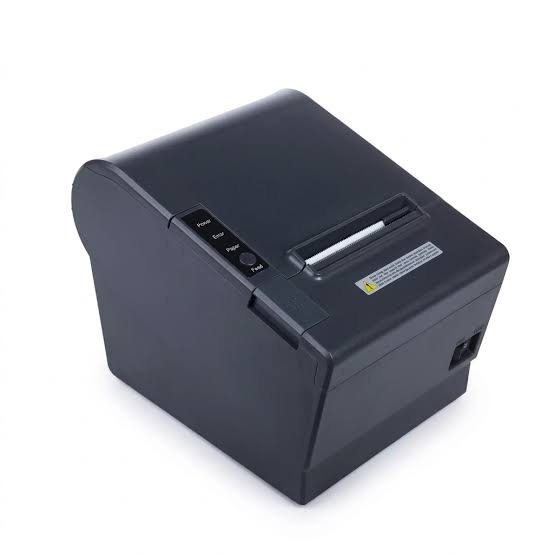
Small businesses often operate in environments where workspace, equipment budgets, and daily resources are limited. Cafés, convenience stores, food trucks, salons, and independent retail shops need practical tools that support transactions without occupying too much counter space. Compact receipt printers offer a convenient solution by combining essential printing functions with space-saving designs.
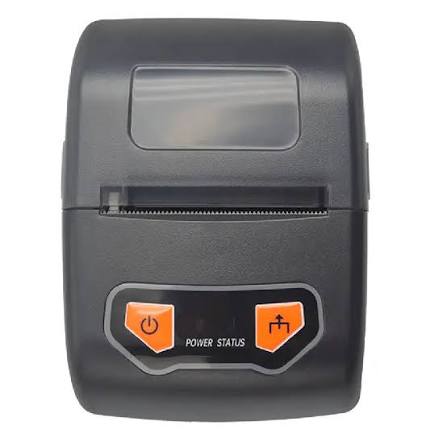
Choosing the right Receipt Printer can help small businesses organize checkout operations, produce customer transaction records, and maintain efficient service. Compact models are particularly useful when businesses need reliable printing equipment that fits into smaller workspaces or supports mobile point-of-sale systems.
1. Space-Saving Design for Limited Workspaces
One of the main advantages of compact receipt printers is their small physical footprint. Small businesses may have limited counter space for computers, payment terminals, cash drawers, product displays, and other equipment.
A compact printer can fit into these environments without taking up unnecessary room. This allows employees to maintain a more organized checkout area while keeping essential devices within easy reach.
For businesses operating from kiosks, small shops, and temporary retail locations, efficient use of available space can make everyday tasks easier.
2. Lower Equipment and Installation Requirements
Many compact receipt printers are designed for straightforward installation and everyday operation. Depending on the model, they may support USB, Bluetooth, or network connections, allowing businesses to select an arrangement that suits their existing POS setup.
A simple installation process can reduce the need for complicated equipment arrangements. Small businesses with limited technical resources may benefit from models that offer accessible configuration options and compatible drivers.
However, buyers should check the required interfaces and software support before purchasing. A compact design alone does not guarantee compatibility with every POS system.
3. Supporting Faster Checkout Operations
Small businesses often rely on a limited number of employees to manage sales, payments, and customer service. Slow transaction processing can increase waiting times and create additional pressure during busy periods.
Compact receipt printers with suitable printing speeds can help employees complete transactions efficiently. Once a payment is processed, the POS system sends the receipt information to the printer, which produces a physical record for the customer.
This can be particularly useful in cafés, bakeries, convenience stores, and independent retail shops where employees handle multiple responsibilities throughout the day.
4. Suitable for Different Types of Small Businesses
Compact printers can support a wide range of business activities. Their applications depend on printing technology, paper compatibility, connectivity, and the type of POS software being used.
Retail Shops
Small retail stores can use compact printers to produce purchase receipts, transaction summaries, and return documentation. Their reduced size helps keep checkout counters organized.
Cafés and Coffee Shops
Cafés often have limited counter space, especially around payment terminals and beverage preparation areas. Compact printers can produce customer bills without occupying a large portion of the workspace.
Food Trucks and Mobile Vendors
Portable receipt printers can support transactions in mobile environments. Models with Bluetooth connectivity and rechargeable batteries may allow vendors to print receipts away from fixed checkout counters.
Salons and Service Businesses
Hair salons, repair shops, and other service providers can use compact printers to produce payment records and itemized service receipts. Their small dimensions are useful for reception desks and service counters.
5. Improving Mobility and Flexible Checkout Arrangements
Some compact receipt printers are designed for portable use. These models may include rechargeable batteries and wireless connectivity, allowing employees to process payments and issue receipts in different locations.
For example, a food truck operator may use a mobile POS device with a portable printer to complete customer transactions. Restaurant employees may also use compatible mobile printing equipment for table-side payments.
This flexibility can help businesses serve customers in areas where installing a permanent checkout station is impractical.
Before choosing a portable model, businesses should evaluate battery capacity, charging requirements, wireless range, weight, and supported paper sizes.
6. Reducing Cable Clutter
Traditional printing arrangements may require several cables connecting the printer to a computer or POS terminal. In a small workspace, these cables can make counters look crowded and limit equipment placement.
Compact printers with wireless connectivity can reduce the need for data cables. Bluetooth models may connect directly to compatible mobile devices, while Wi-Fi printers can communicate through a supported local network.
However, wireless printers still need an appropriate power source unless they use an internal battery. Businesses should also consider signal strength and network reliability when planning installation.
7. Efficient Thermal Printing Technology
Many compact receipt printers use direct thermal printing. This technology relies on a heat-sensitive paper coating that reacts to a thermal printhead, producing text and graphics without traditional ink cartridges or ribbons.
For small businesses, this can simplify routine supply management. Employees do not need to replace ink cartridges or ribbons, although they must keep compatible thermal paper available.
Thermal printers are commonly used for short transaction documents because they can offer fast printing and relatively simple maintenance. Their performance still depends on paper quality, printhead condition, and suitable operating settings.
8. Helping Small Businesses Manage Operating Costs
Small businesses often need to control equipment expenses while maintaining acceptable service quality. Compact receipt printers may provide a practical option because they combine essential printing functions with relatively small designs.
Potential cost-related benefits include:
- Lower space requirements at checkout counters.
- Reduced dependence on complex installation arrangements.
- Simplified supply management with compatible thermal paper.
- Flexible connectivity options for different POS systems.
- Suitable printing capacity for many small-business transaction volumes.
The total cost of ownership should still be considered. Purchase price, paper consumption, maintenance, warranty coverage, and replacement-part availability can all influence long-term expenses.
9. Easy Maintenance and Everyday Operation
Many compact receipt printers are designed with accessible paper compartments and straightforward controls. These features can make routine tasks easier for employees who need to replace paper rolls or respond to basic printing errors.
Regular maintenance should include cleaning accessible areas, removing paper debris, checking cables, and inspecting the paper-feeding mechanism. Thermal printheads should be cleaned according to manufacturer instructions.
Businesses should also use compatible paper rolls to avoid feeding problems and inconsistent print quality. Training employees in basic handling procedures can help reduce avoidable equipment damage.
10. Important Features to Consider Before Purchasing
Not every compact printer is suitable for every business. Buyers should compare specifications with their actual transaction requirements.
Printing Speed
Choose a model that can handle the expected number of daily transactions. A business with frequent checkout activity may need a faster printer than one that processes only occasional sales.
Connectivity
USB may be suitable for fixed POS terminals, while Bluetooth and Wi-Fi can support more flexible arrangements. Confirm that the selected connection method works with the existing software and devices.
Paper Size Compatibility
Check the supported paper width, roll diameter, and paper type. These details affect both supply purchasing and printer operation.
Print Quality
Receipts should display transaction details clearly. If the business needs to print logos, barcodes, or detailed information, test the printer’s output before making a purchase.
Durability
A printer used throughout the day should be suitable for the expected workload and operating environment. Consider component quality, recommended duty cycle, and available technical support.
Software Integration
Confirm that the printer supports the business’s POS application and operating system. Compatible drivers and printing protocols help reduce installation and communication problems.
11. Compact Printers and Modern Point-of-Sale Systems
Modern POS systems often operate on tablets, smartphones, and compact computers rather than traditional desktop terminals. Compact receipt printers can complement these systems by providing physical transaction documentation without requiring large equipment installations.
For example, a small shop may use a tablet as its primary sales terminal and connect a compact printer through USB or Bluetooth. A café may use a wireless printer to support transactions at different service points.
This combination can help small businesses create flexible checkout arrangements while keeping their equipment requirements manageable.
12. Compact Printers Versus Larger Receipt Printing Models
Compact and larger printers serve different operational requirements. Compact models generally prioritize space efficiency and portability, while larger commercial devices may offer features intended for more demanding workloads.
| Comparison factor | Compact receipt printers | Larger receipt printers |
|---|---|---|
| Physical size | Designed for limited spaces | Require more installation space |
| Portability | Some models support mobile use | Generally designed for fixed locations |
| Typical applications | Small shops, cafés, kiosks, and mobile vendors | Supermarkets and high-volume retail environments |
| Connectivity | USB and wireless options may be available | USB, Ethernet, and other interfaces may be available |
| Workload suitability | Depends on the model’s rated capacity | Some models are designed for frequent, continuous use |
Businesses should choose based on expected printing volume rather than physical size alone. A compact model may be sufficient for a small shop, while a larger operation may require equipment designed for heavier workloads.
13. The Growing Importance of Compact Printing Solutions
Small businesses increasingly use flexible technology to manage payments, inventory, and customer interactions. Tablet-based POS systems, mobile payment terminals, and cloud-based business applications have changed how checkout equipment is arranged.
Compact printers fit naturally into these environments because they can support smaller workstations and mobile transaction processes. Improvements in wireless connectivity, battery performance, and printing technology may also expand their applications.
As business requirements evolve, compact printing solutions are likely to remain useful for organizations that prioritize efficient workspace management and adaptable service arrangements.
Conclusion
Compact receipt printers provide several practical benefits for small business environments. Their space-saving designs, flexible connectivity, straightforward operation, and suitability for mobile POS systems make them useful for retail shops, cafés, food trucks, and service providers.
The most suitable model depends on transaction volume, printing speed, paper compatibility, connectivity, and software requirements. By evaluating these factors carefully, small businesses can select a compact printing solution that supports organized checkout operations and reliable everyday performance.